CHAPTER 6. ERROR HANDLING
The figForth model provides very extensive error checking procedures to ensure compiler security, so that compilation results in correct and executable definitions. To facilitate error checking and reporting, fig-Forth model maintains an user variable WARNING and one or more disk blocks containing error messages.
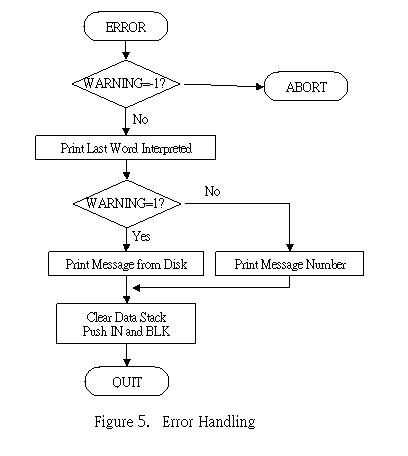
The user variable WARNING controls the actions taken after an error is detected. If WARNING contains 1, a disk is present and screen number 4 in Drive 0 is supposed to be the base location of all error messages. If WARNING contains 0, no disk is available and error messages will be reported simply by an error number. If WARNING contains -1, the word (ABORT) will be executed. The user can modify the word (ABORT) to define his own error checking policy. In the fig-Forth model, (ABORT) calls ABORT which restarts the system (warm start). The error handling process is best shown in a flow chart in Fig. 5.
: ?ERROR f n --
Issue error message n if the boolean flag f is true.
SWAP Test the flag f.
IF ERROR True. Call ERROR to issue error message.
ELSE DROP No error. Drop n and return to caller.
ENDIF
;
: ERROR n -- in blk
Issue error message and restart the system. FigForth saves the contents in IN and BLK on stack to assist in determining the location of error.
WARNING @ 0< See if WARNING is -1,
IF (ABORT) if so, abort and restart.
ENDIF
HERE COUNT TYPE Print name of the offending word on top of the dictionary.
." ?" Add a question mark to the terminal.
MESSAGE Type the error message stored on disk.
SP! Clean the data stack.
IN @
BLK @ Fetch IN and BLK on stack for the operator to look at if he wishes.
QUIT Restart the Forth loop.
;
: (ABORT) --
Execute ABORT after an error when WARNING is -1. It may be changed to a user defined procedure.
ABORT ;
: MESSAGE n --
Print on the terminal n'th line of text relative to screen 4 of Drive 0.
WARNING @ Examine WARNING .
IF (WARNING)=1, error messages are on disk.
-DUP
IF n is not zero
4 OFFSET @ B/SCR / -
Calculate the screen number where the message resides.
.LINE Print out that line of error message.
ENDIF
ELSE No disk.
." MSG#" . Print out the error number instead.
ENDIF
;
Now we have the utilities to handle error messages, we shall present some error checking procedures defined in fig-Forth.
: ?COMP --
Issue error message 11 if not compiling.
STATE @ Examine STATE .
0= Is it 0 ?
11 ?ERROR Issue error message if STATE is 0, the executing state.
;
: ?EXEC --
Issue error message 12 if not executing.
STATE @ If STATE is not zero,
12 ?ERROR issue error message.
;
: ?PAIRS n1 n2 --
Issue error message 13 if n1 is not equal to n2. This error indicates that the compiled conditionals do not match.
- Compare n1 and n2. If not equal,
13 ?ERROR issue error message.
;
: ?CSP --
Issue error message 14 if data stack pointer was altered from that saved in CSP .
SP@ Current stack pointer
CSP @ Saved stack pointer
- If not equal,
14 ?ERROR issue error message 14.
;
: ?LOADING --
Issue error message 16 if not loading screens.
BLK @ If BLK=0, input is from the terminal.
0=
16 ?ERROR Issue error message.
;
: ?STACK --
Issue error message if the data stack is out of bounds.
SP@ S0 > SP is out of upper bound, stack underflow
1 ?ERROR Error 1.
SP@ HERE 128 + < SP is out of lower bound, stack overflow
7 ?ERROR Error 7.
;