CHAPTER 3. TEXT INTERPRETER
The text interpreter, or the outer interpreter, is the operating system in a Forth computer. It is absolutely essential that the reader understand it completely before proceeding to other sections. Many of the properties of Forth language, such as compactness, execution efficiency and ease in programming and utilization, are embedded in the text interpreter. When the Forth computer is booted up, it immediately enters into the text interpreter. In the default interpretive state, the Forth computer waits for the operator to type a line of commands on his console terminal. The command text string he types on the terminal, after a carriage return being entered, is then parsed by the text interpreter and appropriate actions will be performed accordingly.
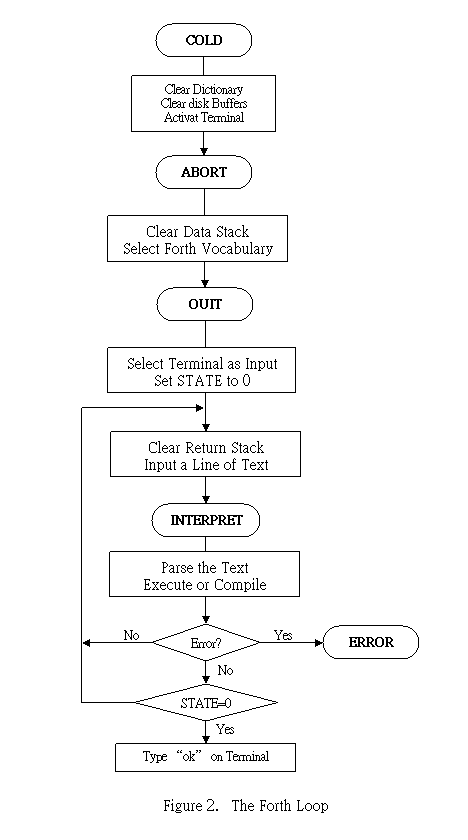
To make the discussion of text interpreter complete, we shall start with the definition, COLD , meaning starting the computer from cold. COLD calls ABORT . ABORT calls QUIT where the text interpreter, properly named INTERPRET , is embedded. These definitions are discussed in this sequence. It is rather strange to start the text interpreter with words like ABORT and QUIT . The reason will become apparent when we discuss the error handling procedures. After an error is detected, the error handling procedure will issue an appropriate error message and call ABORT or QUIT depending upon the seriousness of the error.
This major Forth monitoring loop is schematically shown in Fig. 2. Although nothing new is shown in the flow chart, it is hoped that a graphic diagram will make a lasting impression on the reader to help him understand more clearly the concepts discussed here.
: COLD --
The cold start procedure. Adjust the dictionary pointer to the minimum standard and restart via ABORT . May be called from terminal to remove application program and restart.
EMPTY-BUFFERS Clear all disk buffers by writing zero's from FIRST to LIMIT.
0 DENSITY ! Specify single density diskette drives.
FIRST USE ! Store the first buffer address in USE and PREV , preparing for disk accessing.
FIRST PREV !
DR0 Select drive 0 by setting OFFSET to 0.
0 EPRINT ! Turn off the printer.
ORIG Starting address of Forth codes, where initial user variables are kept.
12H +
UP @ 6 + User area
10H CMOVE Move
16 bytes of initial values over to the user area.
Initialize the terminal.
ORIG 0CH + @ Fetch the name field address of the last word defined in the trunk Forth vocabulary, and
FORTH 6 + ! Store it in the FORTH vocabulary link. Dictionary searches will start at the top of FORTH vocabulary. New words will be added to FORTH vocabulary unless another vocabulary is named.
ABORT Call ABORT , the warm start procedure.
;
: ABORT --
Clear the stacks and enter the interpretive state. Return control to operator's terminal and print a sign-on message on the terminal.
SP! A primitive. Set the stack pointer SP to its origin S0 .
DECIMAL Store 10 in BASE , establishing decimal number conversions.
CR Output carriage return and line feed to terminal.
." fig-Forth" Print sign-on message on terminal.
FORTH Select FORTH trunk vocabulary.
DEFINITIONS Set CURRENT to CONTEXT so that new definitions will be linked to the FORTH vocabulary.
QUIT Jump to the Forth loop where the text interpreter resides.
;
: QUIT --
Clear the return stack, stop compilation, and return control to terminal. This is the point of return whenever an error occurs in either interpretive or compilation states.
0 BLK !
BLK contains the current disk block number
under interpretation.
0 in BLK indicates the text should come from the terminal.
[COMPILE] Compile the next IMMEDIATE word which normally is executed even in compilation state.
[ Set STATE to 0, thus enter the interpretive state.
BEGIN Starting point of the 'Forth loop'.
RP! A primitive. Set return stack pointer to its origin R0 .
CR CR/LF
QUERY Input 80 characters of text from the terminal. The text is positioned at the address contained in TIB with IN set to 0.
INTERPRET Call the text interpreter to process the input text.
STATE @ 0= Examine STATE .
IF STATE is 0, in the interpretive state
." ok" Type ok on terminal to indicate the line of text was successfully interpreted.
ENDIF
AGAIN Loop back. Close the Forth loop .
;
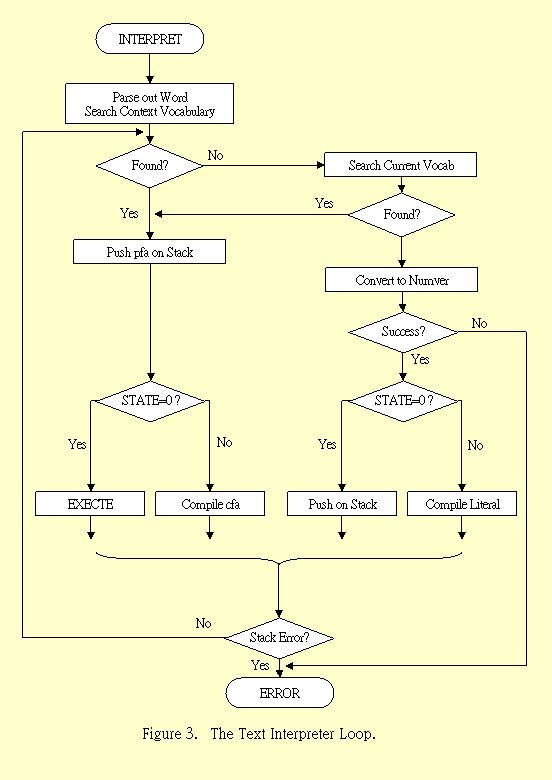
If the interpretation was not successful because of some errors, the error handling procedure would print out an error message and then jump to QUIT . Fig.3 shows the text interpreter loop in which linesof text are parsed and interpreted.
: INTERPRET --
The text interpreter which sequentially executes or compiles text from the input stream (terminal or disk) depending on STATE. If the word cannot be found after searching CONTEXT and CURRENT, it is converted to a number according to the current base. That also failing, an error message echoing the name with a " ?" will be printed.
BEGIN Start the interpretation loop
-FIND Move the next word from input stream to HERE and search the CONTEXT and then the CURRENT vocabularies for a matching entry. If found, the dictionary entry's parameter field address, its length byte, and a boolean true flag are left on stack. Otherwise, only a false flag is left.
IF A matching entry is found. Do the following:
STATE @ < If the length byte < state , the word is to be compiled.
IF CFA , Compile the code field address of this word to the dictionary
ELSE Length byte > state, this is an immediate word,
CFA then put the code field address on the data stack and
EXECUTE call the address interpreter to execute this word.
ENDIF
?STACK Check the data stack. If overflow or underflow, print error message and jump to QUIT .
ELSE No matching entry. Try to convert the text to a number.
HERE Start of the text string on top of the dictionary.
NUMBER Convert the string at HERE to a signed double number, using current base. If a decimal point is encountered in the text, its position is stored in DPL. If numeric conversion is not possible, an error message will be given and QUIT
DPL @ 1+ Is there a decimal point? If there is, DPL + 1 should be greater than zero, i. e., true.
IF Decimal point was detected
[COMPILE] Compile the next immediate word.
DLITERAL If compiling, compile the double number on stack
into a literal, which will be pushed on stack during execution.
If executing, the number remains on stack.
ELSE No decimal point, the number should be a single 16 bit number.
DROP Discard the high order part of the double number.
[COMPILE]
LITERAL If compiling, compile the number on stack as a literal. The number is left on stack if executing.
ENDIF
?STACK Check the data stack overflow or underflow.
ENDIF End of the IF clause after -FIND .
AGAIN Repeat interpretation of the next text string in the input stream.
;
The text interpreter seems to be in an infinite loop without an exit, except the error handling procedures in ?STACK and NUMBER. The normal exit from this loop, after successfully interpreting a line of text, is buried in a mysterious, nameless word called NULL or 'X' in the Forth source code. The true name of this procedure is an ASCII NUL character, which cannot be accessed from the terminal. The text input procedure appends an ASCII NUL character to the end of a text input stream in place of a carriage return which terminates the text stream. After the text stream is successfully processed, the text interpreter will pick up this null character and execute the NULL procedure.
: X --
This name will be replaced by an ASCII NUL character. Terminate interpretation of a line of text from terminal or from disk buffer. Fall into the Forth loop and print " ok" on the terminal and wait for terminal input.
BLK @ Examine BLK to see where the input stream is from.
IF BLK not zero, input from disk buffer.
1 BLK +! Select the next disk buffer
0 IN ! Clear IN, preparing parsing of input text.
BLK @ There are 8 disk buffers. See if the current buffer is the last7
AND 0=
IF The last buffer, the end of the text block.
?EXEC Issue error message if not executing.
R> DROP Discard the top address on the return stack, which is the address of ?STACK after EXECUTE in the interpretation loop.
ENDIF
ELSE BLK=0. The text is from the terminal.
R> DROP Pop off the top of return stack.
ENDIF
;
The top item on the return stack was thrown away. At the end of 'X', the interpreter will not continue to execute the ?STACK instruction, but will return to the next higher level of nesting and execute the next word after INTERPRET in the Forth loop. This is when the familiar " ok"message is displayed on the terminal, prompting the operator for the next line of commands.