CHAPTER 10. VIRTUAL MEMORY
In a computer system, the core memory or the semiconductor memory is a limited and the most expensive resource which users wished to be infinite. Since it is physically impossible to have infinite amount of memory inside a computer, the next best thing is the magnetic disk memory using hard disks or floppy diskettes. Because the characteristics of the disk memory is very much different from those of the core memory, the use of disk memory often requires some device handlers to transfer data or programs between the computer and the disk. In most mainframe computers, disks and other peripherals are treated as files managed by the operating system, which insulates the users from the devices. The usage of the disk memory in high level language thus needs a fair amount of software overhead in terms of memory space and execution speed.
Forth treats the disk as a direct extension of the core memory in blocks of B/BUF bytes. A user can read from these blocks and write to them much the same as he is reading or writing the core memory. Thus the disk memory becomes a virtual memory of the computer. The user can use it freely without the burdens of addressing the disk and managing the I/O. Implementing this virtual memory concept in the Forth system makes available the entire disk to the user, giving him essentially unlimited memory space to solve his problem.
Disk memory in Forth is organized into blocks of B/BUF bytes. The blocks are numbered sequentially from 0 to the disk capacity. Forth system maintains an area in high memory as disk buffers. Data from the disk are read into the buffers, and the data in buffers can be written back to disk. As implemented in the figForth model, each disk buffer is 132 bytes long, corresponding to 128 byte/sector in disk with 4 bytes of buffer information. The length of buffer can be changed by modifying the constant B/BUF which is the number of bytes the disk spits out each time it is accessed, usually one sector. B/BUF must be a power of 2 (64, 128, 256, 512, or 1024). The constant B/SCR contains the value of the number of blocks per screen which is used in editing texts from disk. B/SCR is equal to 1024 divided by B/BUF. Disk buffers in memory are schematically shown in Fig. 9, assuming that each buffer is 132 bytes long.
Several other user variables are used to maintain the disk buffers. FIRST and LIMIT define the lower and upper bounds of the buffer area. LIMIT - FIRST must be multiples of B/BUF + 4 bytes. The variable PREV points to the address of the buffer which was most recently referenced, and the variable USE points to the least referenced buffer, which will be used to receive a new sector of data from disk if requested.
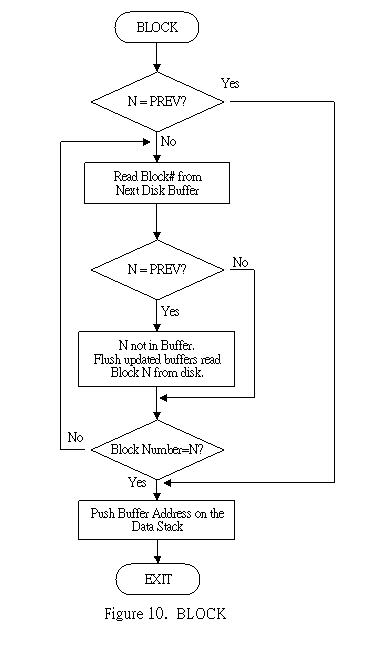
The most important and the most used word to transfer data into and out of the disk is BLOCK. BLOCK calls another word BUFFER to look for an available buffer. BUFFER in turn calls a primitive word R/W to do the actual work of reading or writing the disk. These and other related words are to be discussed here. A flow chart of BLOCK is shown in Fig. 10 for better comprehension.

: BLOCK n -- addr
Leave the memory address of the disk buffer containing data from the n'th block in disk. If the block is not already in memory, it is read from disk to the least recently written disk buffer. If the contents of this disk buffer was marked as updated, it is written back to disk before the n'th block is read and written over data in the buffer.
OFFSET @ + Add disk offset to block number n, allowing access to second or higher disk drives.
>R Save the block number on return stack.
PREV @ Get the block number contained in PREV, pointing to the most recently accessed buffer.
DUP @ Get the block number pointed to by PREV ,
R - Compare to the block number saved on return stack,
DUP + Discard the left most bit, which is the update indicator.
IF Block number n was not previously referenced. Prepare disk access.
BEGIN Scan the buffers and look for a buffer which might contain block n already.
+BUF 0= Advance a buffer
IF This buffer is pointed to by PREV , all buffers scanned.
DROP Discard the buffer address
R BUFFER Find the disk sector, update the sector if necessary.
DUP R 1 R/W Read one sector from the disk.
2 - Backup to the buffer address of block n.
ENDIF
DUP @ Beginning address of the buffer, with a block number in it.
R - Compare to the block number n.
DUP + 0= Discard the update bit,
UNTIL Loop until buffer block number matches n.
DUP PREV ! Store the buffer address in PREV .
ENDIF
R> DROP Clear return stack.
2+ Get the address where data begin.
;
To access a disk block, one uses the command:
n BLOCK
The word BLOCK leaves the address of the first cell containing data read from the disk, and the user can now examine the information in this entire block. If he alters any data in this block, he should make sure that the update bit in the cell preceding the data is set by using the command UPDATE . This way new data will be written back to disk before the buffer is used to access some other block of data.
: +BUF addr1 -- addr2 f
Advance the disk buffer address addr1 to the address of the next buffer addr2 . Boolean f is false when addr2 is the buffer presently pointed to by the variable PREV .
B/BUF 4 + Size of a buffer
+ addr2
DUP LIMIT = addr2=LIMIT?
IF Yes, buffer out of bound.
DROP FIRST Make addr2=FIRST
ENDIF
DUP PREV - Leave boolean flag on stack.
;
: BUFFER n -- addr
Obtain the next block buffer and assign it to block n . If the contents of the buffer were marked as updated, it is written to the disk. The block n is not read from the disk. The address left on stack is the first cell in the buffer for data storage.
USE @ Fetch the user variable USE .
DUP >R Save a copy on return stack.
BEGIN
+BUF Find the next buffer, avoiding the buffer pointed to by PREV
UNTIL
USE ! Store the address to be used the next time.
R @ 0< Test the first cell in the buffer. See if the update bit is set.
IF The buffer was updated. Write its contents back to disk.
R 2+ The first cell of data memory.
R @ 7FFFH AND Discard the update bit. What's left is the block
number of the updated buffer.
0 R/W Write the buffer to disk to update the disk storage.
R/W is the primitive word to read or write a sector of disk.
ENDIF
R ! Write n to address pointed to by USE .
R PREV ! Assign this buffer as PREV .
R> 2+ addr pointing to the first data cell in the buffer.
;
: R/W addr n f --
This is the fig-Forth standard disk read/write linkage. addr specifies the source or destination block buffer, n is the sequential block number on disk, and f is a flag. f=0 for disk write and f=1 for read. R/W calculates the physical location of the block on disk, performs the read or write operations, and does an error checking to verify the transaction. R/W is a primitive word whose definition depends on the CPU and the disk interfacing hardware.
As mentioned before, each buffer has B/BUF + 4 bytes of memory. The first cell in the buffer contains a disk block number in the lower 15 bits. Thus the Forth system can address up to 32767 blocks of virtual memory. The msb or 16th bit in this cell is call the 'update bit'. When this bit is set by the word UPDATE, the Forth system will be notified that the contents in this buffer were altered. When the memory space of this buffer is needed to receive another block of data, the update bit when set causes the buffer to be written back to the disk before the other block is read in. It is this update bit which controls the disk system so that the disk always has the data kept up to date. If the update bit is not set, the contents in the buffer should be identical to those on the disk and there is no need to rewrite the buffer back to disk. Hence the new block is directly read in and overwriting the old block buffer.
The data of B/BUF bytes start at the second cell in the buffer. The last cell should always be zero, which is the stop signal to the compiler. The user should be very careful not to change this cell. If this cell is not zero, the compiler might compile across the buffer boundaries and most likely would cause the system to crash. A null byte in the text string will force the text interpreter to execute the NULL or 'X' word, which terminates the compiling process and returns control to the text interpreter.
: UPDATE --
Mark the most recently referenced disk buffer, pointed to by PREV as altered. This buffer will subsequently be written back to disk should it be required to store a different block of data.
PREV @ @ Fetch the first cell in the buffer pointed to by PREV .
8000H OR Set the update bit.
PREV @ ! Store back.
;
: EMPTY-BUFFERS --
Erase all disk buffers. Updated buffers are notwritten back to disk. This word is used in case the user knows that the buffers were disturbed and he wishes to preserve the unmodified data on disk.
FIRST Start of buffer
LIMIT End of buffer
OVER - Length of buffer in bytes
ERASE Clear the buffers by writing zeros into them.
;
In cases where more than one disk drive is used in a system, a user variable OFFSET is maintained so that the user can easily access the second or higher drives as conveniently as the first drive. OFFSET contains the first block number of a particular drive. The words DR0 and DR1 are defined to switch between disk drives:
: DR0 --
0 OFFSET ! ;
: DR1 --
2000 OFFSET ! ;
In this case the first drive has 2000 sectors of storage volume.
: FLUSH --
Write all updated buffers back to disk.
NBUF+1 Total number of buffers + 1
0 DO Go through all buffers
0 BUFFER Force updated buffers to be written back to disk.
DROP Discard the buffer data address.
LOOP
;
Disk storage is mainly used for two purposes: to store programt ext, and to store data. The storing and retrieving of data are topics of application outside the scope of this book. Basically, the data flow to and from disk can be controlled by the word BLOCK and its relatives as discussed previously in this Chapter. On the other hand, Forth has provided special mechanisms to process program text stored on disk. The text interpreter can process input text either from the terminal of from disk blocks and it interprets or compiles them in a similar fashion.
A user variable BLK contains the block number if the text to be interpreted comes from the disk block of that number. If BLK contains a zero, the interpreter will assume that the input text is from the terminal. The command to interpret text in block n is:
n LOAD
: LOAD n --
Begin interpreting screen n . Loading will be terminated at the end of the screen or at ;S .
BLK @ >R Save BLK on return stack. BLK contains the current block
number under interpretation. Saving it allows one disk block
to load other disk blocks, the nested loading.
IN @ >R The character pointer pointing to the next word to be
interpreted has to be saved also.
0 IN ! Initialize IN to point to the beginning of text block.
B/SCR * Find the block number from the screen number n .
BLK ! Store the block number in BLK .
INTERPRET Call text interpreter to process the text block.
R> IN ! After interpreting the whole block, restore IN and BLK .
R> BLK !
;
As discussed in WORD, WORD takes its input from the terminal if BLK is zero; otherwise, it calls BLOCK to bring in a block of text disk and starts interpretation at the beginning of the block. In each disk buffer the first cell (the head) contains a block number with its msb as the update bit, and the last cell (the tail) contains two bytes of zero. After the text interpreter scans over the entire block, it will eventually pick up the tail of zeros. The interpretation will be terminated at this point because the zero (ASCII NUL) forces the interpreter to execute the NULL or 'X' word which prints "ok" message on terminal and returns control to the terminal. To terminate the interpretation before the end of a block, the word ;S should be used in a text block.
Saving BLK and IN on the return stack allows the nesting of LOAD commands. In a block of text, 'n LOAD' can be used to suspend temporarily the loading of the current block and start loading text from the n'th block. The general practice in most Forth systems is to reserve a block containing nothing but load commands. This is called a load block. When the load block is interpreted, it will load in all the blocks needed for an application, like a bootstrap routine in a conventional computer.
In a large project the program text spreads over many blocks. If the text is sequential over a range of blocks, a word --> can be used to continue interpretation across the block boundary to start interpretation of the next block.
: --> --
Pronounced "next screen". Continue interpreting the next disk block.
?LOADING Issue an error message if not loading.
0 IN ! Initialize IN , the character pointer.
B/SCR Blocks/screen
BLK @
OVER MOD - Increment value to the next block.
BLK +! New block number stored in BLK .
;
IMMEDIATE The crossover of block boundary must be executed immediately.
If the text is not written in sequential blocks, a load block should be used instead of the --> command. The load block with appropriate comments serves also as a directory of the blocks involved in an application. Since --> acts like a GOTO statement without returning to the place it started, its use is discouraged. The loading block is much preferred.